
Run MSI file
Runs MSI installation file.
Description
Optionally, you may add comments here describing the purpose of this element.
Path
Choose the path to a .msi file.
APPLICATION DATA PATH - Program subfolder in Application Data folder.
CDROM PATH - CD or DVD drive.
CUSTOM PATH - The path must be defined in the filename control.
INSTALL PATH - Default installation path.
SETUP FILE PATH - The path to where setup executable file is running.
SYSTEM PATH - Windows system directory.
TEMPORARY PATH - The temporary folder of the installation #tempinstpath#. It is a subfolder genteeXX in the default temporary user's folder #temppath#.
WINDOWS PATH - Windows directory.
Filename
Name of the .msi file to be started. It must have MSI extension.
Administrative Install
Checked => Applies the administrative installation option.
Quiet Mode
Checked => There is no user interaction.
Unattended Mode
Checked => The installation shows only a progress bar.
No Restart
Checked => The machine will not be restarted after the installation is complete.
Uninstall Product
Checked => Uninstalls the specified product.
Wait until application finishes
If this is checked, the installation will be suspended until the running application finishes. Macro #isrunok# will equal 1 if the application ran successfully. Otherwise, it will equal zero. You can use macro #runret# in the next commands to get the result of the finished application.
Log Filename
If you want to use log-file option then specify the log filename in this field. For example, #setuppath#\mylog.log
Interface
You can select the interface for the MSI setup.
If Condition
You can specify a condition that should be met for the action to be performed. If the condition is false then the command is skipped. See How to use If Condition for more details.
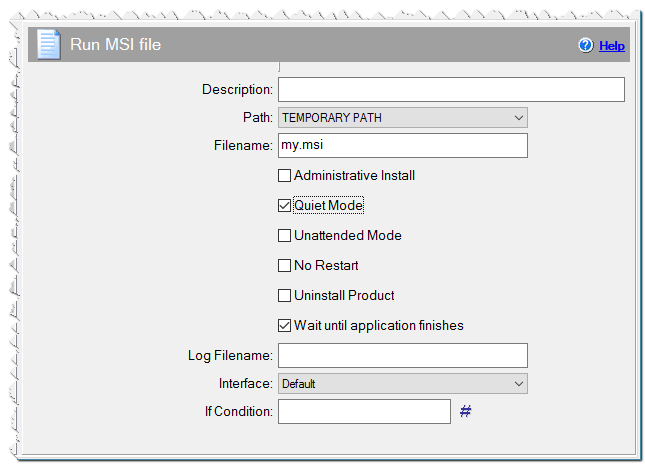
Run MSI file command