
Superposition of variables
Consider the situation where you have two variables, one of which contains the name of another variable.
varA = Test text
varB = varA
How can we turn to the variable varB and receive the value of the variable varA. If we write ##varB##, we obtain #varA#. It is also possible that you have a set of variables with the same prefix or suffix, and you need to get the value of the corresponding variable. For example, how do we get #[my#var#]# from the variables below?
myOrange = Test message Orange
myApple = Test message Apple
myLemon = Test message Lemon
var = Apple
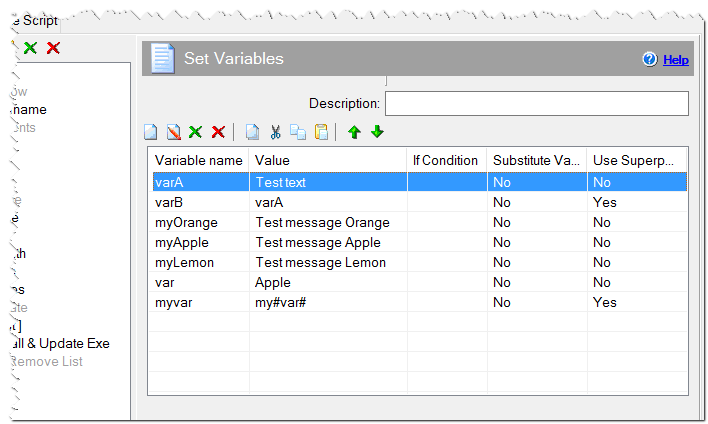
List of variables
Unfortunately, it is not possible to write #[my#var#]#, but the Set Variables command has the Use Superposition checkbox. If this checkbox is checked, then the installation takes the value of variable with the name that is specified in the value. In the first case, we need to check such a checkbox when you assign the varB variable.
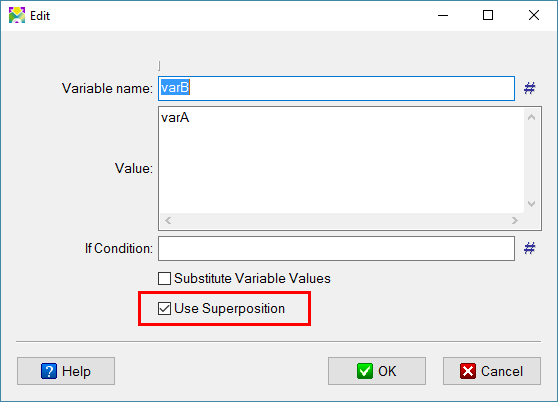
Superposition of the varB variable
In the second case, we need to use an additional variable myvar with the value my#var#. After that, the values of these variables are, respectively, Test text and Test message Apple.
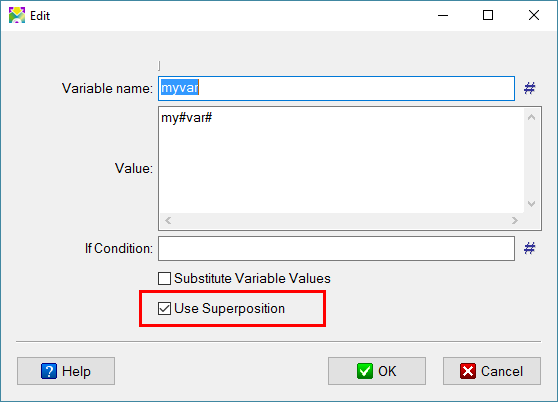
Superposition of the myvar variable