
Download Files
Downloads one or several files to the user's computer via HTTP protocol. Also, you can use this command to send requests with parameters with the GET method.
Description
Optionally, you may add comments here describing the purpose of this element.
Site URL
You can specify a common URL of the site. In this case, specify a relative URL to the file.
Support HTTPS protocol
Check this checkbox on if you specified the secure https web server in Site URL field or you are going to use https web servers in the URL parameter of the list.
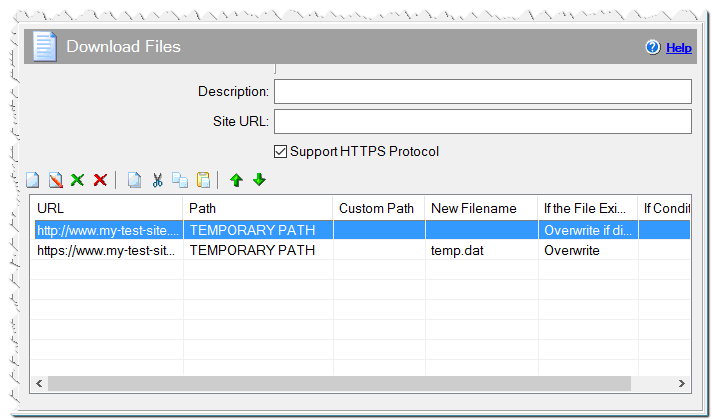
Download Files command
URL
Specify the URL of the file to be downloaded. Specify an absolute URL beginning with http:// or relative URL.
Path
Choose the path, in which the file will be saved.
APPLICATION DATA PATH - Program subfolder in Application Data folder.
CDROM PATH - CD or DVD drive.
CUSTOM PATH - The path must be defined in the filename control.
INSTALL PATH - Default installation path.
SETUP FILE PATH - The path to where setup executable file is running.
SYSTEM PATH - Windows system directory.
TEMPORARY PATH - The temporary folder of the installation #tempinstpath#. It is a subfolder genteeXX in the default temporary user's folder #temppath#.
WINDOWS PATH - Windows directory.
Custom Path
If you use a CUSTOM PATH, the directory must be specified here.
New Filename
You can specify a new filename.
If the File Exists
What should be done if a file being downloaded already exists on user's hard drive.
Skip - do not download the file.
Overwrite - download and overwrite the existing file.
Overwrite if different size - downlooad and overwrite the file only if the downloading file has the different size than the already existing one.
If Condition
You can specify a condition that should be met for the action to be performed. If the condition is false then the command is skipped. See How to use If Condition for more details.
Resulting variable
You can specify the name of the variable which will equal 1 if the file has been successfully downloaded. Otherwise, the value of the variable equals 0. The [variable name]_file contains the full name of the downloaded file.
If you use this command within Dialog - Progress, the progress bar will show the progress of the download. Define the 'dwn_progsize' variable and assign it to 1 before downloading. You can specify a custom dialog box text and increment the size with the command Progress Settings.
Comment
You can add a comment for this setting here.