
Create CAB (MS Cabinet) File
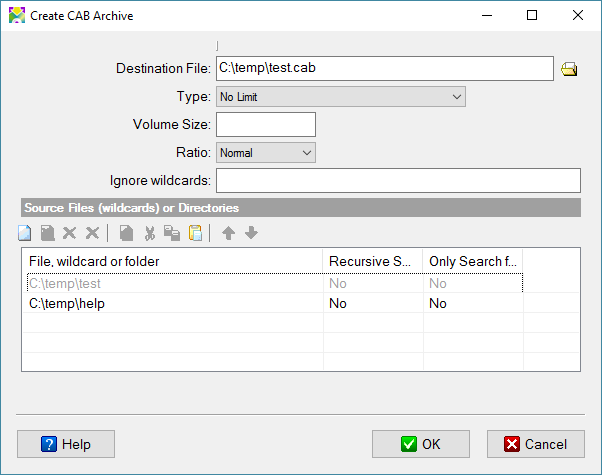
This dialog allows you to create CAB archive files. You can compress any files to CAB file and distribute it with your setup.exe. Use Decompress CAB file command in your installation script to unpack CAB files.
Destination File
Specifies a full path for the resulting CAB file or files.
Type
No limit - the installation will not be divided into volumes.
Volume size (KB) - you have to specify volume size as kilobytes in the field below.
Volume size (MB) - you have to specify volume size as megabytes in the field below.
Volume size
Maximum volume size in Kilobytes or Megabytes according Type.
Ignore wildcards
You can specify the wildcards of excluded files (by semicolon). These files will be ignored during the packing process. You can use '*' and '?' characters.
*.bak; temp*.dat
Create CAB archive
Source files (wildcards) or directories
File, wildcard or folder
Enter a filename or a folder on your computer (including path and drive designation), which should be included in the setup, or use the browsing buttons to select them. If you enter a directory, it will be packed together with all of its files and then re-created on the target computer.
C:\myapp\*.*
C:\picture
C:\files\myfiles.a??
Recursive Search
Checked => enables recursive search in all subdirectories.
Seek Files Only
Checked => uses the specified wildcard only for seeking files.