
Temporary files
This command allows the easy addition of temporary files in your installation. When calling this command files will be unpacked into the temporary folder #tempinstpath#. Be sure that the files have different names otherwise they will be rewritten. Images for Dialog - Settings can be temporary files. After completion of the installation the temporary files will be automatically deleted. If you require more settings during packing of the temporary files you can use the Installation Files command.
Description
Optionally, you may add comments here describing the purpose of this element.
File name or mask.
Specify file name (or mask) which you want to include in the installation as a temporary file.
c:\my temp\*.jpg
c:\images\myimage.gif
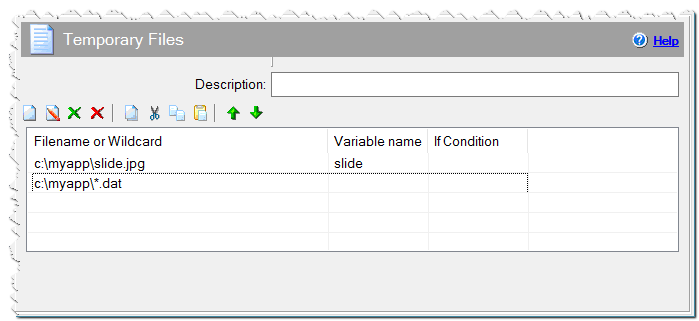
Temporary files command
Variable Name
Name of variable, where the full path name of the unpacked temporary file will be written. This parameter is optional, you can directly get and use the file’s full name in the following commands such as #tempinstpath#\filename.ext. For example, #tempinstpath#\myimage.gif
If Condition
You can specify a condition that should be met for the action to be performed. If the condition is false then the command is skipped. See How to use If Condition for more details.
Comment
You can add a comment for this setting here.