
Check
Check user's rights, locked files, open windows etc.
Description
Optionally, you may add comments here describing the purpose of this element.
What to Check
You can select the following resource types to be checked.
Locked File - The command will detect if the file, specified in the Name field is locked by another application.
Exact Window Name - Presence of a window with the specified title in the Name field.
Window Name Substring - Presence of a window, the title of which contains the specified substring.
Process - A process is running with the specified file name.
Directory Exists - The command will detect if the specified directory exists. Use Name for specifying the directory name.
File Exists - The command will detect if the specified file exists. Use Name for specifying the filename.
Windows version - You can specify unsupported Windows versions for your setup. Versions are specified by comma separation. Possible values: 95,98,ME, NT,2000,XP,2003,VISTA,WIN7,WIN8,WIN81,WIN10.
CD-DVD drive path - In case of multiple CD readers, you can search for the drive which the disk was inserted in, with the check of "CD-DVD drive path". If you define the variable [varname]_rem as 1 before the check, then the removable (USB drive) will also be checked. [varname] equals Resulting variable.
Mutex - The command will detect if the mutex with the specified name exists.
Logged Users - Determines if there are other logged users on this computer.
Negation of Condition
Checked => Negates the condition ( false => true, true => false ).
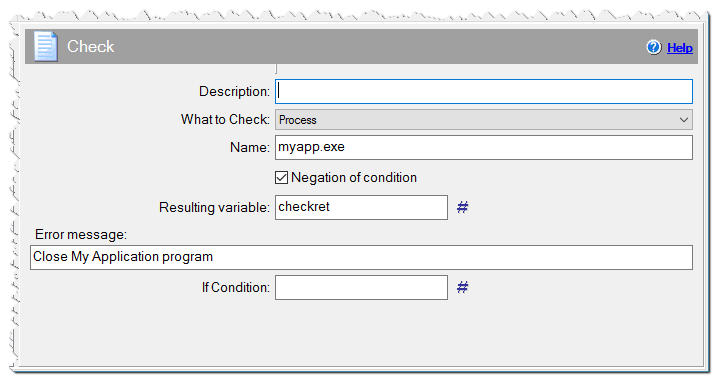
Check command
Name
The string that describes the resource being checked.
for Locked File - #setuppath#\myapp.exe
for Exact Window Name - My Application
for Window Name Substring - App
for Process - myapp.exe
for File Exists - #setuppath#\myapp.exe
for Directory Exists - #setuppath#
for Windows Version - 95,98,ME
for CD-DVD drive path - the filename which the setup will search on CD/DVD
for Mutext - specify the name of the mutex
for Logged Users - you can specify a variable name,
where the number of other logged users will be saved.
Resulting variable
The result of the check will be stored in the variable you name here. You can use this variable further as #varname#.
for Locked File - will be set to 1 if the file is locked, zero if not.
for Exact Window Name - will be set to 1 if the such window was found, zero if not. Additionally, the variable [varname]_winlist contains the "Process Identifier|Full filename|Caption|Window ID(HWND)". If there are more windows with the specified name, each process will be written in a separate line. You can further analyze these results with the Split variable command.
for Window Name Substring - will be set to 1 if the window with this substring was found, zero if not. Also, the variable #wincaption# equals the full caption of the found window. The variable [varname]_winlist contains the "Process Identifier|Full filename|Caption|Window ID(HWND)", as for case the exact window name.
for Process - will be set to 1 if there is such a process, zero if not. If the process exists, then [varname]_file variable will equal the full filename of the executable file and [varname]_dir variable will equals the directory of the executable file, the [varname]_run variable will equals the number of instances currently running. Additionally, the variable [varname]_proclist contains the "Process Identifier|Full filename". If there are more process with the specified name, each process will be written in a separate line. You can further analyze these results with the Split variable command.
for File Exists - will be set to 1 if the file exists, zero if not.
for Directory Exists - will be set to 1 if the directory exists, zero if not.
for CD-DVD drive path - will be set to 1 if the file exists on CD/DVD (or Flash drive), zero if not. The variable [varname]_file will contain the full path of the file. The variable [varname]_drv will contain the letter of the drive where the file is stored.
for Windows Version - will be set to 1 if the user has an unsupported Windows version, zero if not.
for Mutex - will be set to 1 if the mutex exists, zero if not.
for Logged Users - will be set to 1 if there are other logged users, zero if not. If the query fails, the value is 255.
Error Message
Optionally specify a text message here. The user will see a warning message box with 'Retry' or 'Cancel' actions. If you define the variable [varname]_next (where [varname] equals Result variable) as 1 before the check, and also specify an "Error message", you can continue the installation by clicking on the "Ignore" button.
Close My Application and press 'Retry' button
If Condition
You can specify a condition that should be met for the action to be performed. If the condition is false then the command is skipped. See How to use If Condition for more details.