
EN RU
Log in
Home
Download
Purchase
Documentation
Support
Contact us
 
Help  /  Command Reference  /  Registry & INI

Registry - Delete

Here you can specify the subkey or value to be deleted from the Registry.

Description
Optionally, you may add comments here describing the purpose of this element.

Root Key
Select one of the root Registry keys.

Subkey
The name of the Registry subkey.

Software\My company\#appname#

Delete subkey
Checked => deletes the Registry subkey with all subkeys and values.

Delete only empty subkey
Checked => deletes the Registry subkey only if it doesn't contains any subkeys and values.
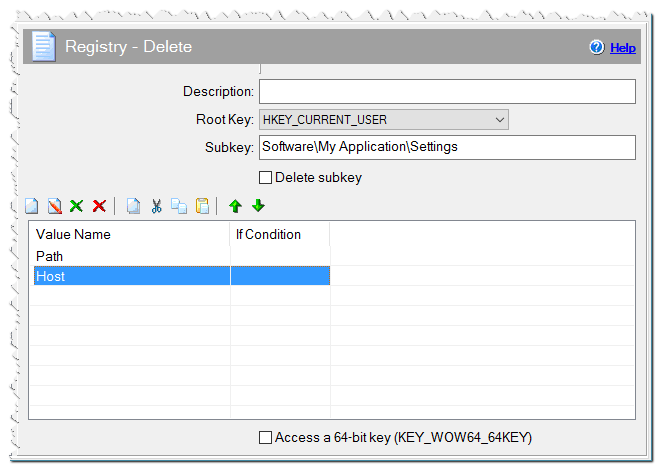
Registry - Delete command

Value Name
Specify the name of the value to be deleted.

If Condition
You can specify a condition that should be met for the action to be performed. If the condition is false then the command is skipped. See How to use If Condition for more details.

Comment
You can add a comment for this setting here.

Access a 64-bit key (KEY_WOW64_64KEY)
Checked => Enable the setup to access redirected keys in the 64-bit registry view.

Eonza automation software - free, open source cross-platform program for easy creation and management of scripts.
  • Command Reference
    • Application
    • Dialogs
    • Files
    • Internet
    • Messages & Sound
    • Programming
    • Register DLL & Fonts
    • Registry & INI
      • Global Environment - Append
      • Global Environment - Delete Path
      • Global Environment - Get
      • Global Environment - Set
      • INI File - Delete
      • INI File - Formatting
      • INI File - Get Value
      • INI file – Insert text
      • INI File - Set Value
      • Import .REG File
      • Registry - Delete
      • Registry - For Each
      • Registry - Get Value
      • Registry - Set Value
    • System
    • Text Files
    • Uninstaller
    • Variables
Copyright © Novostrim, OOO, 2009-2026 All rights reserved.