
Registry - Set Value
Writes values into the Registry.
Description
Optionally, you may add comments here describing the purpose of this element.
Root Key
Select one of the root Registry keys.
Subkey
Name of the Registry subkey.
Software\My company\#appname#
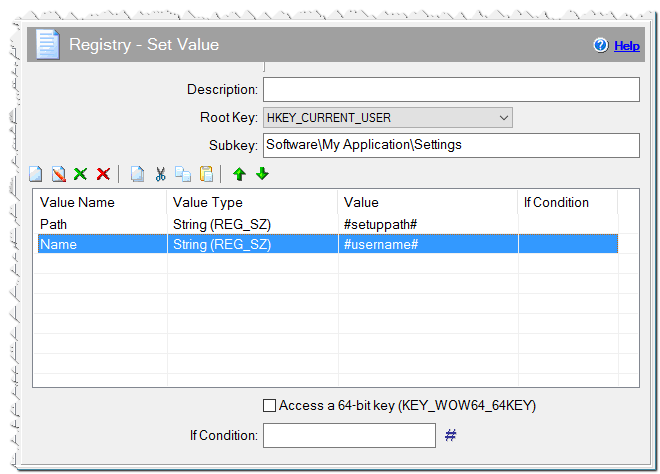
Registry - Set Value command
Value Name
Name of subkey value, in which the data will be recorded. If not specified, the subkey value will be set to "(default)".
Value Type
Specify the value type.
String - A string value.
Number - The value will be listed in the Registry as a number. Value should be specified as decimal or hexadecimal.
20678 0xFF56
Binary - In this case the value will be represented as a byte succession. Bytes should follow one another in hexadecimal notation.
001000a8ff67 => (0x00, 0x10, 0x00, 0xa8, 0xff, 0x67)
Expanded string - Expanded string EXPAND_STRING.
Multistrings - Strings must be separated by '|' character.
The first string|The second string
Value
The value to be written.
Comment
You can add a comment for this setting here.
Access a 64-bit key (KEY_WOW64_64KEY)
Checked => Enable the setup to access redirected keys in the 64-bit registry view.
It is necessary to note that if you enter read or write in the registry key HKEY_CURRENT_USER, it will be written to the user HKEY_CURRENT_USER, who launched the installation. If the user has administrator rights, the current user username and the user, who launched the installation originaluser will be the same and writing will occur direclty to HKEY_CURRENT_USER. Let's look at a situation, when the user User does not have administrator rights. In this case, it is necessary to switch into administrator mode as an administrator, for example, Administrator. Accordingly, the variable originaluser will equal User, and username will equal Administrator. The registry root HKEY_CURRENT_USER corresponds to Administrator/HKEY_CURRENT_USER. If we don’t take this situation into consideration, after the installation and launch of a program by a user User, the program won't see the data it wrote to Administrator/HKEY_CURRENT_USER. CreateInstall considers this possibility, so all calls to HKEY_CURRENT_USER are redirected to User/HKEY_CURRENT_USER for correct future functioning of the program being installed.
If Condition
You can specify a condition that should be met for the action to be performed. If the condition is false then the command is skipped. See How to use If Condition for more details.