
Background - Show
Shows the background window of the installation.
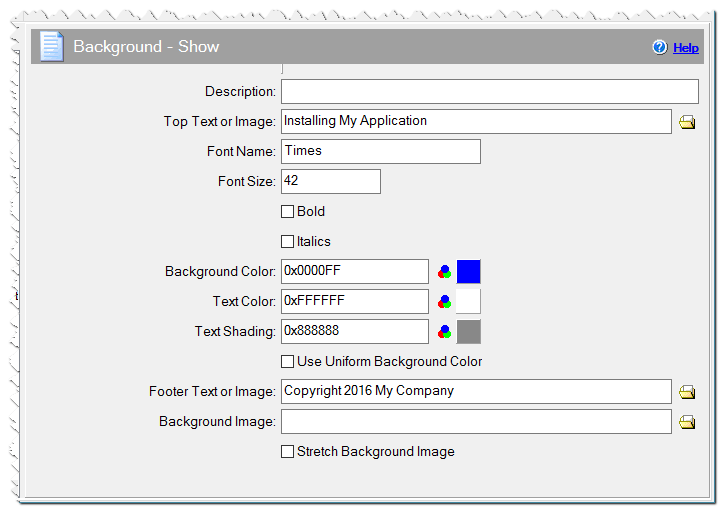
Description
Optionally, you may add comments here describing the purpose of this element.
Caption
You may specify a custom caption for the background window. The default caption is the same as in dialog boxes.
Remove caption
Checked => the full title bar will be removed from the top of the screen.
Top Text or Image
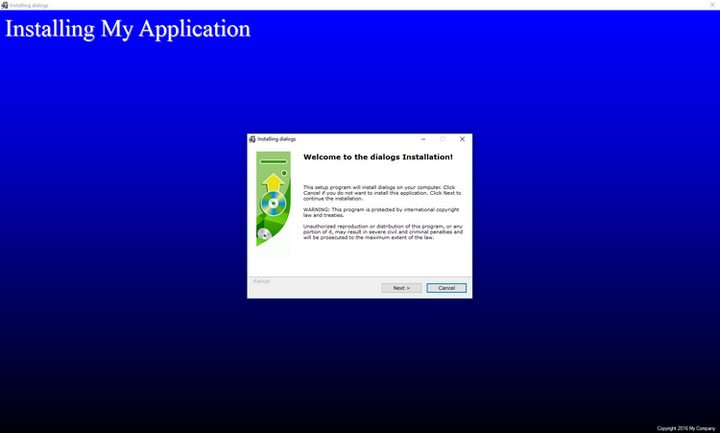
Text you enter here will be shown in the upper left-hand corner of the background window. Alternatively, you can specify an image (.bmp, .gif, .jpg) that will be shown instead of the text.(Multi-line text can be specified)
Font Name
Here you can set the header font (top left corner text)
Font Size
The size of the header font.
Bold
Checked => use bold typeface for the header text.
Italic
Checked => use italicized typeface for the header text.
Background - Show command
Background/text/shade color
You can select the background window color, the text color and the shade of the text . You can use either RGB-format numerical color values or the standard Windows color selection window.
Use Uniform Background Color
Checked => the background will be a uniform color
Unchecked => a gradual transition from the selected color, in the upper part of the screen, to black, at the bottom.
Footer Text or Image
You may enter text that will be shown in the bottom right-hand corner of the background window in a small font. Alternatively, you can specify an image file that will be shown instead of text in the bottom right-hand corner. (Multi-line text can be specified)
Align
By default, the bottom text or image appears in the bottom right corner. You can select whether the text or the image is aligned to the left, center or right.
Font Name
Here you can set the footer font (bottom text)
Font Size
The size of the footer font.
Bold
Checked => use bold typeface for the footer text.
Italic
Checked => use italicized typeface for the footer text.
Text color
You can select the color for the footer text. You can use either RGB-format numerical color values or the standard Windows color selection window. Default, if left blank, will be the color of the text, the negative color of the given background color. When using a background image, it is white.
Background Image
If you enter an image file here, the background will display this image instead of a background color.
Stretch Background Image
Checked => the image will be stretched.
Unchecked => the image will be tiled.
Full screen background
Checked => The wallpaper/color will be full screen. (the tray will not be visible).
Remove background
Checked => if you have previously specify a Background - Show command, the background will be removed here.
Background - Show example