
Sound
Plays WAV file.
Description
Optionally, you may add comments here describing the purpose of this element.
Type
Choose the type of play action. Specify a directory if you don't want to include a WAV file into the setup, but you know this directory contains that WAV file. In this case, specify the relative path to the WAV file.
Data\sounds\my.wav
#tempinstpath#\my.wav
APPLICATION DATA PATH - Program subfolder in Application Data folder.
CDROM PATH - CD or DVD drive.
CUSTOM PATH - The path must be defined in the filename control.
INSTALL PATH - Default installation path.
SETUP FILE PATH - The path to where setup executable file is running.
SYSTEM PATH - Windows system directory.
TEMPORARY PATH - The temporary folder of the installation #tempinstpath#. It is a subfolder genteeXX in the default temporary user's folder #temppath#.
WINDOWS PATH - Windows directory.
Include File Into Setup - in this case, the specified WAV file will be included in your setup.
Stop - Stop playing a WAV file. Leave the field WAV Filename empty in this case.
WAV Filename
Specify the WAV filename, depending on the previous parameter.
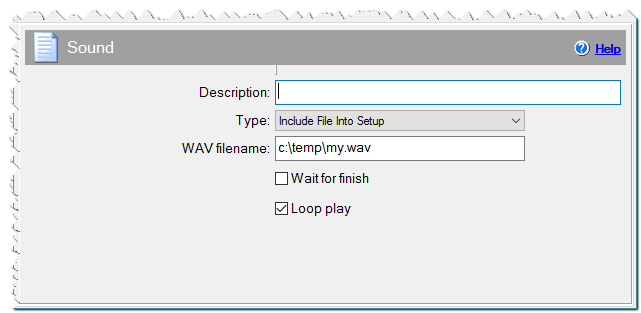
Sound command
Wait For Finish
Checked => plays WAV file and continues the script.
Unchecked => plays WAV file while launching the next command and subsequent commands.
Loop Play
Checked => play WAV file continuously.
If Condition
You can specify a condition that should be met for the action to be performed. If the condition is false then the command is skipped. See How to use If Condition for more details.