
Popup Window
Shows a popup text or image. This command can contain other commands. The popup window will be shown while the inner actions are underway . For example, you might have a pop up text "Unpacking files…" displayed while the unpacking process is underway.
Description
Optionally, you may add comments here describing the purpose of this element.
Type
You can select the type of the popup window.
Text - Popup window with an installation icon and text.
Image - Popup .bmp, .gif, .jpg image. It can be, for example, a loading image.
Style of window frame
From the combobox list, you can choose from multiple frame styles.
Always on top
Checked =>If you want the popup window to stay in the foreground.
Do not appear on taskbar
Checked =>If you don't want the popup window to be shown in the taskbar.
Popup Text or Image File
Specify the required text or image bitmap file (.bmp).
for Image - c:\Data\load.jpg
for Text - Wait 10 seconds...
Minimum Timeout (msec)
Specify the minimum time in milliseconds for the text or image to display.
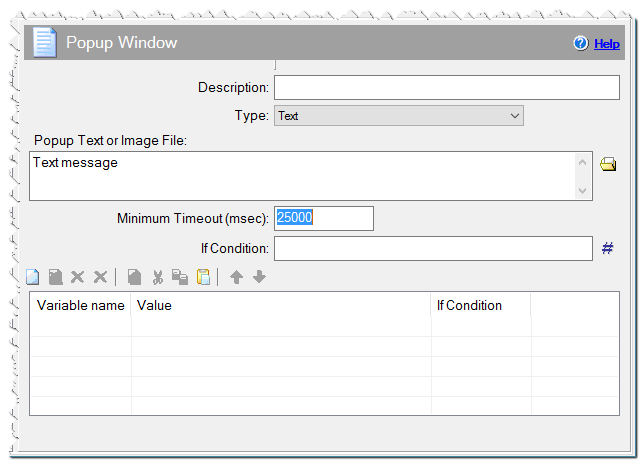
Popup Window command
If Condition
You can specify a condition that should be met for the action to be performed. If the condition is false then the command is skipped. See How to use If Condition for more details.
Options available for Popup Text
Icon File
Display a custom icon before the text. Select the (.ico) file. The installer will contain the icon specified here. If you would like to choose an icon from the user's computer, please use the Popicon variable in the Additional Settings.
Hide Icon
Checked => The popup window won't contain any icon. In this case, the entire area of the window are available for texts.
Auto icon size
Checked => The size of the icon increases automatically as you increase the font size. (If you use this option, it is suggested to use a high resolution icon)
Font Name for text
The font name for the popup window. If "Default" is same as the font name for the dialog windows.
Custom font
The font name for the popup window, if you specified 'Custom Font' in Font Name for text combobox.
Font Size for text
The font size for the popup window. If "Default" is same as the font size for the dialog windows.
Background color
The background RGB color of the popup window.
default = user's window color
Text color
The RGB color of the text that appears in the popup window.
default = user's text color
Horizontal alignment
Left- The text is aligned to left horizontally.
Center - The text is aligned to center horizontally.
Right - The text is aligned to right horizontally.
Vertical alignment
Top- The text is aligned to top vertically.
Center - The text is aligned to center vertically.
Bottom - The text is aligned to bottom vertically.
Auto window resize
Off - No automatic resizing. For resizing, use the S or S:A variable in the Additional Settings.
On (Mode 1) - If the text is longer than the window, the width of the window will be extended, or if the number of lines is greater than the window can display, the height of the window will be extended.
On (Mode 2) - If the text is longer than the width what the window can display, the size of the window will be extended, if the text width is smaller than the window can display, the size of the window will be reduced. If the number of lines is greater than the window can display, the height of the window will be extended. But if the text contains less lines than the window can display, the height of the window not will be reduced.
On (Mode 3) - If the text is longer, or the number of lines are greater than the number of lines what the window can display, the size of the window will be extended, but if the text is smaller or contains less lines than the window can display, the size of the window will be reduced.
The automatic resizing consider whether the window contains an icon or a text under the icon. The height of the window won't be smaller than the sum of the height of the icon and the height of the text(s) under the icon.
Additional Settings
You can modify the position and the size of the popup window. For that, add a special item to Additional Settings list. For modifying the position, the variable name may be M or M:A. In the first case the values will be added to the current position, but in the second case, You need to specify the absolute value for the moving. The value must contain the distance from the left and the top side separated by a colon. In this case you specify the position of the upper left corner of the window. The other 3 sides of the window can also be positioned, in this case, use the M:A:LB (left bottom), M:A:RT (right top), M:A:RB (right bottom) variable names. To specify the center of the window, use the M:A:CP (center-point) variable. By default, you have to specify the value in pixels, but you can also specify it in percents relative to the size of the window. To get the screen size, use the System Information command, Screen client area Resolution parameter.
// The horizontal position does not change, the vertical position will be higher by 100px.
Variable name: M
Value: 0:-100:
// The upper left corner of the window will be placed 50px far of the left and the top
side. (Default)
Variable name: M:A
Value: 50:50
// The bottom right corner of the window will be placed at the specified position. (e.g.
positioning the window at the bottom right corner)
Variable name: M:A:RB
Value: #cx#:#cy# //From the Screen client area Resolution parameter
If you specify an image for the popup window, its size is automatically calculated corresponding to the size of the image. If you use a text popup window, you can change the window size. For that, add a special item to Additional Settings list. The name of the variable should be S or S:A. In the first case, specified values are added to the current width and height, but, in the second case, you have to specify absolute values of the width and height. The value must contain the width and height separated by colon. By default, the size is specified as pixels but you can specify percents, too. For example,
// The width and height are increased by 1.5 times
Variable Name: S:A
Value: 150%:150%
// The width is not changed, the height is increased by 200 pixels.
Variable Name: S
Value: 0:200
// The width is not changed, the height is increased by 2 times.
Variable Name: S:A
Value: 100%:200%
// The width is increased by 10%, the height is increased by 30%.
Variable Name: S
Value: 10%:30%
Dcap - you can re-define the caption of the window. It is enough to specify Dcap variable in the Additional settings.
Dexit - you can specify custom exit message for the popup window, if define to Pcancel variable.
Pcancel - if you specify as 1, you have the option to interrupt the installation process (ESC key). You can use the DOK variable as in dialog windows.
Popstyle - you can specify the style of the window in a variable (0-8). This value overwrites the value set above.
Popfontname - you can specify the font displayed in the window (Font name) in a variable. This value overwrites the value set above.
Popfontsize - you can specify the font size of the font displayed in the window in a variable. This value overwrites the value set above.
Popicon - you can show your own icon which is shown near the text. Add this variable and specify the icon file which you need. The icon must be included in the user's computer. If this icon exists, overrides the above icon setting.
Popicontext - show a short text under the icon.
Popicontextcol - the short text RGB color. (Eg. 0xFF0000 = RED ) default = user's text color.
Popiconpos - specify the vertical offset value in pixels ( Eg. 10 or -20 ) or the absolute vertical position value ( Eg. 5A or 40A ) for the vertical position of the icon. You can specify the center of the icon as a percentage of the window size. For example, 50%, will place the icon vertically in the middle.
Comment
You can add a comment for this setting here.