
Dialog - License
Shows License Agreement dialog.
Description, Header Text, Header Description, Text, Logo Image, Buttons, If Condition
These parameters are explained in Common dialog parameters.
License File
Specify the full path to the license file (TXT or RTF), which is to be displayed. If you don’t want to include any file at the moment installation creation, but rather specify a file during installation, then leave this field blank and define the variable Liclink in additional parameters. If you use the .txt file then save it with UTF-8 encoding.
I Agree
How the user must confirm the agreement.
Radiobutton - two radiobuttons 'I agree' and 'I don't agree'.
Checkbox - a checkbox 'I agree'.
Show Print Button
Checked => the dialog box will have a Print button.
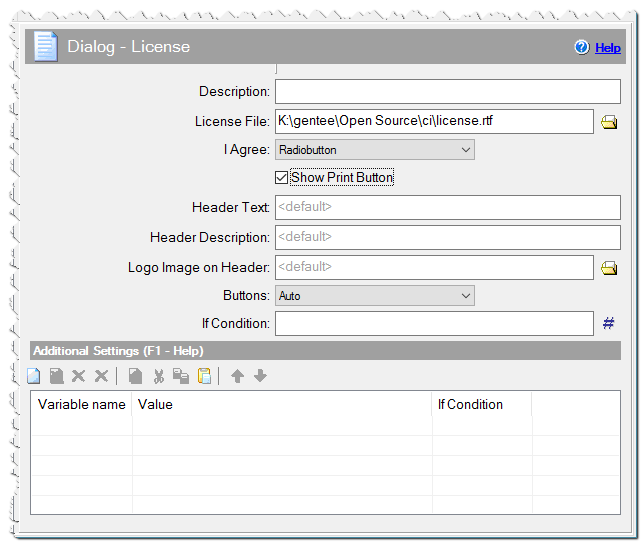
Dialog - License command
Additional Settings
You can define any variables here or specify Variables of dialogs.
Licansi - define and assign this variable to 1, if the license file is in ANSI encoding.
Liccolor - Custom color of License background. Specify 1 if you want to use the user's Window Color. Alternatively, you can specify any RGB color.
Liccolor = 0xFFFFFF - white color.
Lictextcol - Custom color of the License text, for *.txt files. The default color is the same as the text color in the user's windows. You can specify any RGB color. For RTF files, the text color will be the text color of the RTF file.
Lictextcol = 0xFF0000 - red color.
_Lic_[language name] - You can specify a license file for any additional language. The user will see a license agreement according the current installation language.
_Lic_french => c:\licenses\license_fr.rtf
_Lic_russian => c:\licenses\license_ru.rtf
Liclink – use this variable if you want to load a file during installation. In the example below, the file mylicense.txt is shown, which is located with the installation file setup.exe.
Variable: Liclink
Value: #exepath#\mylicense.txt
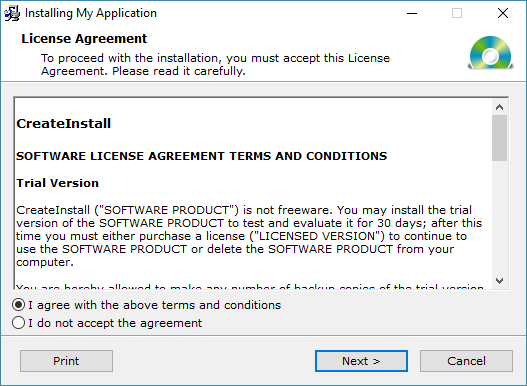
Example of Dialog - License
Lictext - use this variable if you want to get the text of the license from some variable. In the example below, the user will see the text from mylicense variable.
Variable: Lictext
Value: #mylicense#
Liccheck - assign this variable to 1 if you want the license agreement checkbox or radiobutton to be checked, by default.
Variable: Liccheck
Value: 1
Licnocheck - assign this variable to 1 if you want the license agreement radiobutton to be NO checked, by default.
Variable: Licnocheck
Value: 1
Licread - assign this variable to 1 if you want the license agreement checkbox or radio buttons to become available, only if the user scrolls the text of the agreement to the end.
Variable: Licread
Value: 1
Comment
You can add a comment for this setting here.