
Dialog - Ready To Install
Shows Ready To Install dialog box.
Description, Header Text, Header Description, Text, Logo Image, Buttons, If Condition
These parameters are explained in Common dialog parameters.
Text
Specify the text to be displayed. If you want to show some text depending on the value of the variable then use the following expression: ?variablename{ text }. In this case, text is shown if the variable is not zero. You can nest such expressions. If you want to display a text if the variable equals zero, then use the expression ?!variablename{ text }.
#lpathdest#:
   #setuppath#
?actions {Additional settings:
   ?desktop{Create a shortcut on the desktop}
   ?!quick{#notquick#}
}
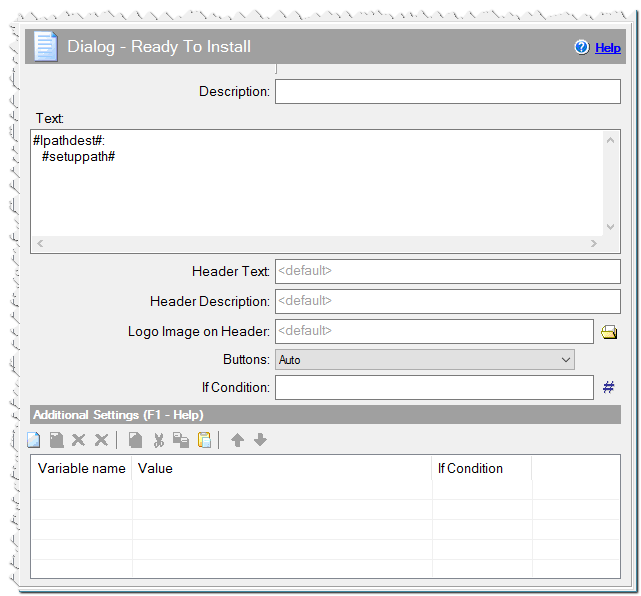
Dialog - Ready To Install command
Additional Settings
You can define any variables here or specify Variables of dialogs.
Readycolor - Custom color of the readme background. Specify 1 if you want to use user's Window color. Alternatively, you can specify any RGB color.
Readycolor = 0xFFFFFF - white color.
Readytextcolor - Custom color of the "Ready To Install" text. The default color is the same as the text color in the user's windows. You can specify any RGB color.
Readytextcolor = 0xFF0000 - red color.
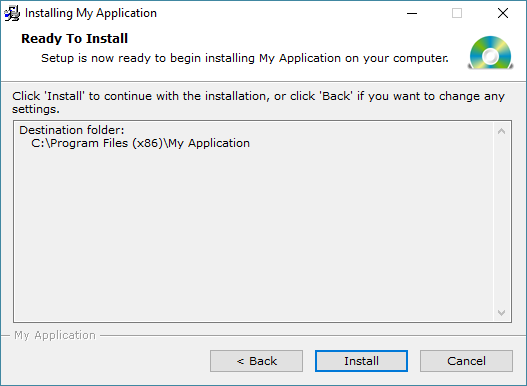
Example of Dialog - Ready To Install
Comment
You can add a comment for this setting here.