
Set Variables
Assigns values to the variables.
Description
Optionally, you may add comments here describing the purpose of this element.
Variable Name
The name of the variable.
mydate
Value
The value to be assigned to the variable. You can use other variables here. For example, you can combine some variables.
08/07/09
#var1##var2##var3#
The installation path of #appname# is #setuppath#.
If Condition
You can specify a condition that should be met for the action to be performed. If the condition is false then the command is skipped. See How to use If Condition for more details.
Substitute Variable Values
No - There will no replace in #varname# variables.
Everywhere - All #varname# variables are replace by their value.
Only in the Value - Only replace #varname# variables in the Value, to their value.
Only in the Variable Name - Only replace #varname# variables in the Variable Name, to their value.
By default, the variable is assigned the specified value without the substitution of the inner variables (if such variables are present). For example, we assign myvar to the value #setuppath#. If the variable setuppath is changed later, then the #myvar# will return the new value of the setuppath.
aaa = a test
myvar = This is #aaa#.
#myvar# returns This is a test.
aaa = an example
#myvar# returns This is an example.
If select to the Only in the Value, then the variable is assigned to the value with substituted variables and the value won't be changed later.
aaa = a test
myvar = This is #aaa#.
#myvar# returns This is a test.
aaa = an example
#myvar# returns This is a test.
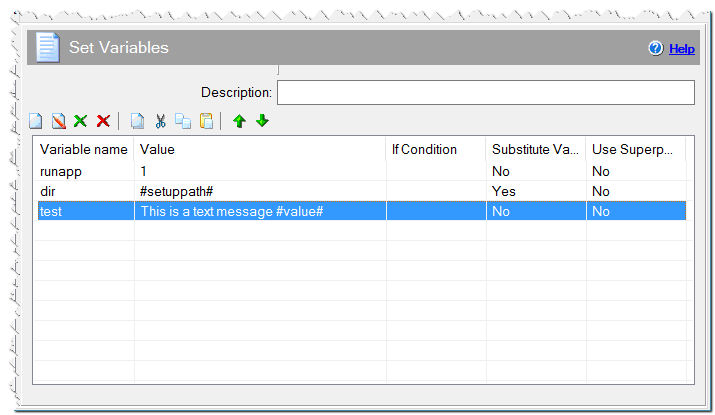
Set Variables command
Use superposition
If this checkbox is checked, then the installation takes the value of variable with the name that is specified in the value. Let's consider the example below. If you check this checkbox when you specify the varB variable, its value will be equal Test text.
varA = Test text
varB = varA
Comment
You can add a comment for this setting here.