
How to track the exit from the installation
There may be times when you need to track the exit from the installation process. By default, the installation removes all temporary files in the case of the successful finish, and in case of the interruption of the installation by the user, but you may want to remove something else. Also, you may want to keep track of what stage is interrupted during the installation process and send data to your web server. CreateInstall allows you to perform additional steps when the installation is complete or interrupted.
Let's create an example project that does nothing but tracks all exits from the installation. You can download it at the link below and check out how it works. We describe the function that will be called at any completion of the installation. For this, we use the Source Code command with the checked External Source Code. Let's insert two messages into it, one message will display the completion code and the dialog, in which the user has completed the installation, and the second one will show in the case of successful completion and ask if the user want to open the website.
func myexitcmdproc (uint code)
{
    macrox_setint ("exitcode", code)
    $body$
}
It should be noted that our function gets the code parameter, which is equal to 0 if the setup has been finished successfully. If the user breaks a dialog, the parameter is equal to 2. If the installation is interrupted with the Exit/Reboot command, the codeis equal to the value that you specified in that command. The function name must end with cmdproc. You must define the variable exitfunc and assign it the name of your function that this function is called when the user exits the installation.
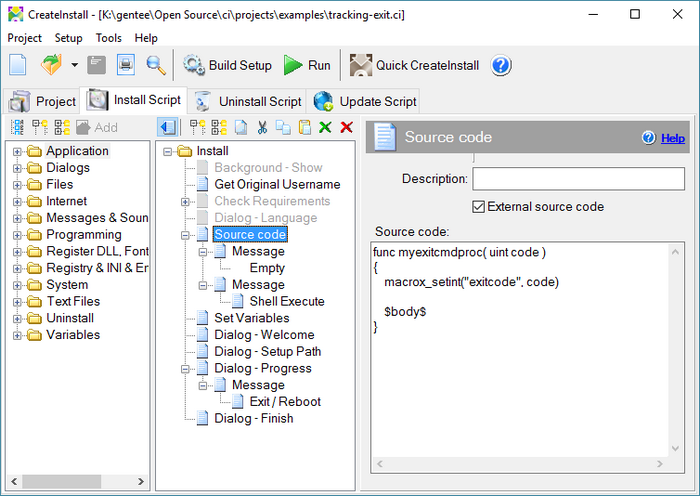
Project - Tracking the exit
In order to determine in which the dialog the installation was interrupted define the same variable with different values in each dialog command. In this example, we assign different values to the dlg variable, and then display it in the message on exit.
