
EN RU
Log in
Home
Download
Purchase
Documentation
Support
Contact us
 

Compare CreateInstall installers

All versions of CreateInstall installers have the same interface. You will not need to relearn the program when you switch versions. You create a script of your installations with the help of commands, which will subsequently be fulfilled during the installation of your application. The main difference between versions is in the number of accessible commands. In the full version you can use all the commands, while in the Light and Freeware versions some commands will not be accessible. Consult the table below to familiarize yourself with a list of commands accessible for each version.

All versions of CreateInstall contain the additional application CreateInstall Assistant. It is a simple installer for novices, with a very simple interface that allows you to create installations, which don’t require complicated tasks very quickly.

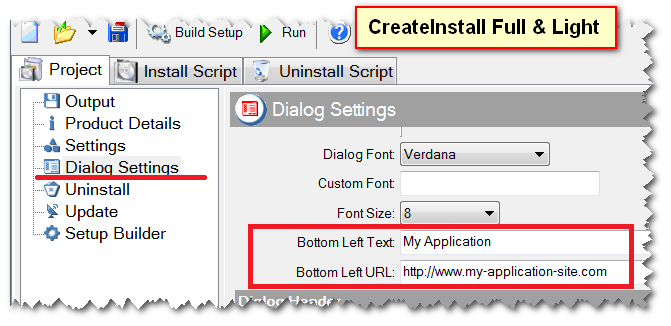
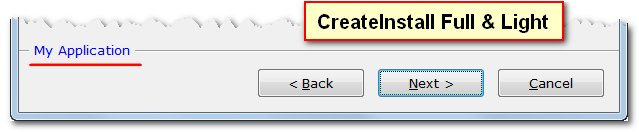
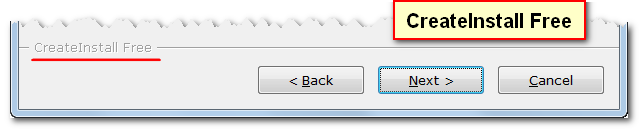
Additionally, the free version does not allow you to specify your own text and link in the lower-left-hand corner of dialog boxes. The word “CreateInstall” will always be shown in the lower-left-hand corner in installations created with the free version. The screenshots below show this difference.

Command list Free Light Full
The text in the lower left portion of dialog boxes CreateInstall Free Any text or link
Add To Add/Remove List yes yes yes
Background - Show yes yes yes
Check Requirements yes yes yes
Create Uninstall & Update Ex yes yes yes
Dialog - Confirmation yes yes yes
Dialog - Finish yes yes yes
Dialog - Language yes yes yes
Dialog - License yes yes yes
Dialog - Not Deleted Files yes yes yes
Dialog - Progress yes yes yes
Dialog - Progress (Uninstaller) yes yes yes
Dialog - Ready To Install yes yes yes
Dialog - Setup Path yes yes yes
Dialog - Welcome yes yes yes
Exit/Reboot yes yes yes
Get File Information yes yes yes
Get Original Username yes yes yes
If statement yes yes yes
INI File - Get Value yes yes yes
INI File - Set Value yes yes yes
Installation Files yes yes yes
Language Resources yes yes yes
Log Processing yes yes yes
Message yes yes yes
Notice yes yes yes
Register DLL/OCX/TLB yes yes yes
Registry - Get Value yes yes yes
Registry - Set Value yes yes yes
Run application yes yes yes
Run As Original User yes yes yes
Run-time Packages yes yes yes
Set Variables yes yes yes
Shell execute yes yes yes
Shortcut - Create yes yes yes
Shortcuts [List] yes yes yes
Temporary Files yes yes yes
Action After Reboot   yes yes
Associate Extension   yes yes
Check   yes yes
Close application   yes yes
Command Line Parameters   yes yes
Copy Files   yes yes
Copy Files List   yes yes
Create Folders   yes yes
Decompress ZIP file   yes yes
Delete lines   yes yes
Dialog - Password   yes yes
Dialog - Readme   yes yes
Dialog - Settings   yes yes
Dialog - Start Menu Folder   yes yes
For statement   yes yes
Get Application Information   yes yes
Global Environment - Get   yes yes
Global Environment - Set   yes yes
INI file – Insert text   yes yes
Insert text into file   yes yes
Modify Variable   yes yes
Popup Window   yes yes
Read variable from file   yes yes
Redirect Console Output   yes yes
Register C# and VB.NET DLL   yes yes
Register Font   yes yes
Registry - For Each   yes yes
Rename file or folder   yes yes
Replace within files   yes yes
Run MSI file   yes yes
Run Uninstaller   yes yes
Set File Attributes   yes yes
Sound   yes yes
Split Variable   yes yes
Substitute Variables in Files   yes yes
System Information   yes yes
Uninstall Log Mode   yes yes
While statement   yes yes
Write variable to file   yes yes
Add Log String [File]     yes
Add Log String [Registry]     yes
Backup files     yes
Calculate hash     yes
Call function     yes
Catch Exit     yes
Check VC++ Redistributable     yes
Create Scheduled Task     yes
Create service     yes
Decompress 7z file     yes
Decompress CAB file     yes
Decompress Files     yes
Delete Files     yes
Delete Scheduled Task     yes
Delete service     yes
Dialog - Backup     yes
Dialog - Browser     yes
Dialog - Checkbox List     yes
Dialog - Custom     yes
Dialog - Slideshow     yes
Dialog - Tree     yes
Dialog - User Name & Serial     yes
Download Files     yes
Embedded files     yes
For statement with Split     yes
Function     yes
Get drive space     yes
Get letter of drives     yes
Global Environment - Append     yes
Global Environment - Delete Path     yes
HTTP GET/POST Request     yes
Import .REG File     yes
Parse Text     yes
Progress Settings     yes
Registry - Delete     yes
Replace Text     yes
Restore Backup Files     yes
Run JavaScript & VBScript     yes
Search Files & Folders     yes
Share & Permission     yes
Sleep     yes
Source code     yes
Start/Stop service     yes
Timeout     yes
Wow64Redirection     yes


See also

  • Get to know the CreateInstall installer
Eonza automation software - free, open source cross-platform program for easy creation and management of scripts.
  • Help
    • Introduction
    • Get to know CreateInstall
    • Compare installers
    • License Agreement
    • License Light
    • License Free
    • Program features
    • Command Reference
    • FAQ
    • Examples & tips
    • CreateInstall Assistant
    • Problem solving
    • Setup Extractor
Copyright © Novostrim, OOO, 2009-2026 All rights reserved.