
Search for Files & Folders
Looks for files and folders on the user's machine. This command can contain other commands, which you may insert into this command for further processing. Inner commands will be called for each found file. The full name of the found file will be stored in the specified macro. You can stop the search at any moment, assign the search_end variable to 1 in inner commands for that.
Description
Optionally, you may add comments here describing the purpose of this element.
Filename or Wildcard
Specify the name of the file or folder that you wish to find. Also, you may use wildcards for searching.
myapp.exe
proc.*
Variable name
The name of the variable, to which the full name of the found file(s) will be written. There are the following resulting variables:
| Variable name | Description |
| [var] | The found file. |
| [var]dir | The directory where the file was found. |
For example, if you specified variable name as curfile, then
#curfiledir# - the folder of the file.
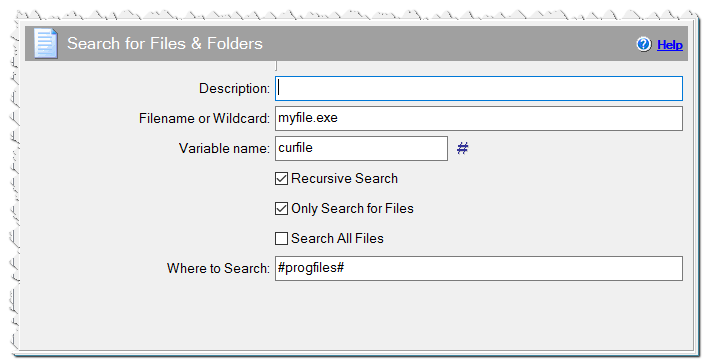
Search for Files & Folders command
Recursive Search
Check this checkbox to enable recursive search in all subdirectories.
Only Search for Files
Check this checkbox to use the specified wildcard only to search for files.
Search All Files
Check this checkbox if you want to find all files meeting the filename criteria. Otherwise, the search is stopped when the first file is found.
Where to Search
By default, the command looks for files on all hard drives on the user's machine. You can limit the search by entering a starting point here. This will limit the search to the drive/folder entered (and its subfolders, if the Recursive Search setting is checked).
You can enter multiple drive/folder names, separated by semicolons.
c:\temp
#winpath#
#progfiles#
c:\temp;#temppath#
c:\;d:\