
Wow64Redirection On/Off
By default, 32bits application cannot write anything in the Program Files folder for 64bits applications. Windows automatically redirects file operations of 32-bits applications to the Program Files (x86) folder. This command allows you to enable or disable redirection if you want to write some files into the 64-bits Program Files folder or 64-bits System folder. For example, you want to install some files in 64-bits Program Files. In this case, enter the command 64xRedirection State: Off and the command Installation Files with the necessary files and destination path #progfiles64#\My Application. After that, enter the command 64xRedirection State: On.
Description
Optionally, you may add comments here describing the purpose of this element.
64xRedirection State
Specify Off or On. Off - disables redirection. On - enables redirection.
Variable Name
The name of the variable, to which the 64-bits Program Files folder will be written. You can use #varname# as a destination path for 64-bits applications and according files. Also, #[varname]sys# contains the System folder on Windows 64bits. This variable contains Program Files (#progfiles# ) if your setup runs on Windows 32bits.
progfiles64
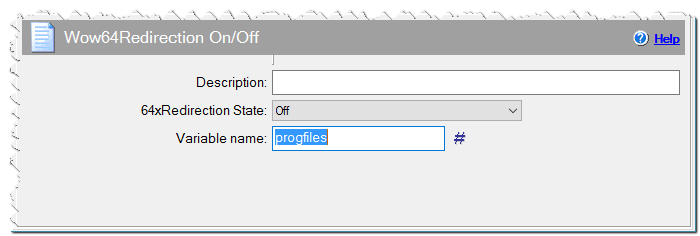
Wow64Redirection On/Off command
If Condition
You can specify a condition that should be met for the action to be performed. If the condition is false then the command is skipped. See How to use If Condition for more details.