
Replace within files
Replaces substrings and variables within files. This command replaces all variables of the type #varname# with their values in the specified files, if the Substitute Variable Values is enabled. Additionally, you can specify any strings to be replaced, and their new values.
Description
Optionally, you may add comments here describing the purpose of this element.
Path
Choose a path to the file.
APPLICATION DATA PATH - Program subfolder in Application Data folder.
CDROM PATH - CD or DVD drive.
CUSTOM PATH - The path must be defined in the filename control.
INSTALL PATH - Default installation path.
SETUP FILE PATH - The path to where setup executable file is running.
SYSTEM PATH - Windows system directory.
TEMPORARY PATH - The temporary folder of the installation #tempinstpath#. It is a subfolder genteeXX in the default temporary user's folder #temppath#.
WINDOWS PATH - Windows directory.
Filename or Wildcard
The name or the wildcard or file to be replaced. If you selected CUSTOM PATH, specify the full path to the file.
*.txt
Recursive Search
No - Searches for files in the specified folder only.
Recursive search always - Enables searching in subdirectories.
Recursive search only if use wildcard - If you use Wildcard, you can enable search in subdirectories.
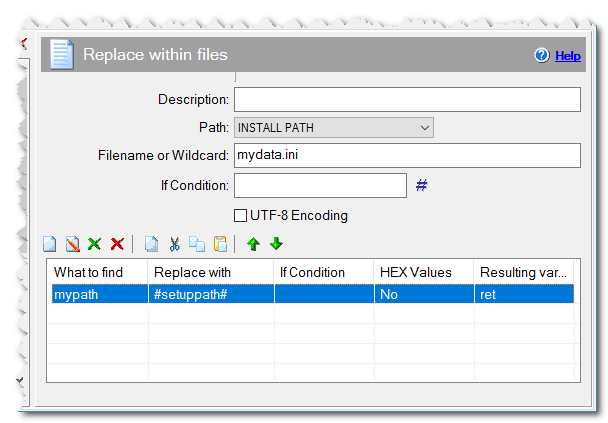
Replace within files command
Ignore case
Check this box if you want the substring search to ignore case.
Substitute Variable Values
No - There will no replace in #varname# variables.
Everywhere - All #varname# variables are replace by their value.
Only in the File - Only replace #varname# variables in the file to their value.
Suppose you specify the value of some variable in the substring search, for example:
What to find: #myvar#
Replace with:  #newvar#
In this case, by default, the substring #myvar# will be searched for and it will be substituted with the string #newvar# without substitution of those variables’ values. If you want all variables #varname# used in search and substitution substrings to be replaced with their values, select option to Only in the File or Everywhere. In this case, a substring equal to the value myvar will be searched for and replaced with the value newvar.
Encoding
Select if the file is UTF-8 or Unicode encoded.
Remove BOM characters
Check this checkbox if you want remove the UTF-8 or Unicode BOM characters from the beginning of the files.
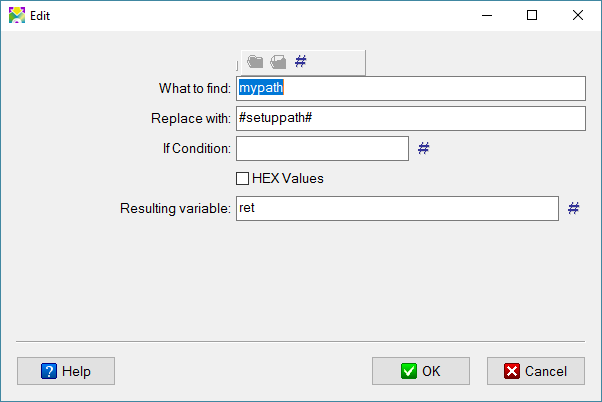
Replace within files dialog box
What to find
The string that will be replaced.
Replace with
The new string, which will replace the found string.
HEX Values
If you check the "HEX Values" checkbox in the list, then the "What to find" and "Replace with" fields can be filled with hexadecimal values (00-FF). For example, you can replace the 0D or 0A values to the 0D0A values, or the 00 value to the 0D0A values, otherwise reading as a text file will not be possible. If a file contains 0x00 values, then the following values cannot be read as text.
Resulting Variable
The "Resulting variable" in the list will contain the number of occurences of the current text in the file and the filename separated by semicolon. (It can be useful if the filename contains any wildcard.) The variable #repfile_rep_allcount# contains the number of replaced texts in the current file and the filename separated by semicolon. (It can be useful if the filename contains any wildcard.) The variable #repfile_count# contains the number of found files. (It can be useful if the filename contains any wildcard.)
If Condition
You can specify a condition that should be met for the action to be performed. If the condition is false then the command is skipped. See How to use If Condition for more details.
Comment
You can add a comment for this setting here.