
Get File Information
Gets information (size, time, attributes, version etc.) about the specified file.
Description
Optionally, you may add comments here describing the purpose of this element.
Path
APPLICATION DATA PATH - Program subfolder in Application Data folder.
CDROM PATH - CD or DVD drive.
CUSTOM PATH - The path must be defined in the filename control.
INSTALL PATH - Default installation path.
SETUP FILE PATH - The path to where setup executable file is running.
SYSTEM PATH - Windows system directory.
TEMPORARY PATH - The temporary folder of the installation #tempinstpath#. It is a subfolder genteeXX in the default temporary user's folder #temppath#.
WINDOWS PATH - Windows directory.
Filename
Specify the filename about which you want to get information.
Variable name
The name of the variable into which the information will be written. This command specifies some variables with different postfixes and assigns them the according information.
There are the following resulting variables:
| Variable name | Description |
| [var] | The full name of the file. |
| [var]ver | The ProductVersion of the file. |
| [var]fver | The FileVersion of the file. |
| [var]spver | Unicode string of the ProductVersion of the file. |
| [var]sfver | Unicode string of the FileVersion of the file. |
| [var]sfprodname | Unicode string of the ProductName of the file. |
| [var]sfcompname | Unicode string of the CompanyName of the file. |
| [var]sfdescr | Unicode string of the FileDescription of the file. |
| [var]sflangid | The langid/codepage of the file. |
| [var]size | The size of the file. |
| [var]exist | Equals 1 if the file exists. |
| [var]used | Equals 1 if the file is used by another process. |
| [var]write | Equals 1 if the file can be opened and written. |
| [var]dir | Equals 1 if it is a folder. |
| [var]readonly | Equals 1 if the file has the attribute Read only. |
| [var]hidden | Equals 1 if the file has the attribute Hidden. |
| [var]system | Equals 1 if the file has the attribute System. |
| [var]archive | Equals 1 if the file has the attribute Archive. |
| [var]ctime | The creation date and time as a line. |
| [var]atime | The last access date and time, as a line. |
| [var]wtime | The last write date and time, as a line. |
| [var]swtime | The last write date and time, as SSMMHHDDMMYYYY. |
| [var]year | Year of the last modification. |
| [var]month | Month of the last modification. |
| [var]day | Day of the last modification. |
| [var]hour | Hour of the last modification. |
| [var]minute | Minute of the last modification. |
| [var]second | Second of the last modification. |
The suffix spver, sfver, sfprodname, sfcompname, sfdescr, sflangid, by default, the source of the first language of the file will be read. If You define a variable suffix before retrieving the file information, as [var]flang, You can choose the language whose source you would like to read from the multilingual file. The first language value is 0, the second is 1...
For example, if you specified variable name as fi then
#fisize# - the size of the file
#fiwtime# - the date and time of the last modification
#fisflangid# - The langid/codepage of the file (Eg. 1033/1200)
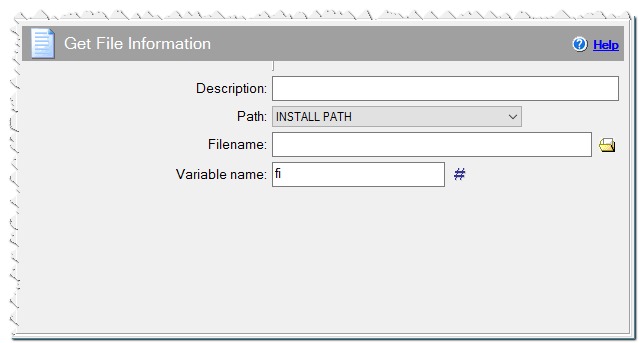
Get File Information command