
Embedded files
Embed the files in the installation script with the CreateInstall installer. This command doesn't compress these files with other installation files. These files are embedded in the source code of the installation script. The content of each file is assigned to the specified variable. The files are not stored anywhere on the user's computer during the installation process. This feature can be useful when your script uses files with sensitive information. The set Embed Mode->In memory files must be textual files. Embedding a binary file is described below or set the Embed Mode->As temporary file.
Description
Optionally, you may add comments here describing the purpose of this element.
Encoding
You can choose to encode the files. This can be UTF-8, Unicode or Binary file.
Remove BOM characters
Check this checkbox if you want remove the UTF-8 or Unicode BOM characters from the beginning of the file.
Embed Mode
In memory - Full list, Up to max. 1-2 MB of only text files. The file name can only contain ANSI characters.
As temporary file - Recommended for larger text and binary files. The file name can also be a UTF file name.
Filename
Specify the name of the file on your computer, which must be embedded in the installation script. You can specify it by pressing the right browse button.
C:\data\settings.ini
C:\myapp\data.txt
Variable name
The name of the variable , to which the content of the file will be written.
If Condition
You can specify a condition that should be met for the action to be performed. If the condition is false then the command is skipped. See How to use If Condition for more details.
Comment
You can add a comment for this setting here.
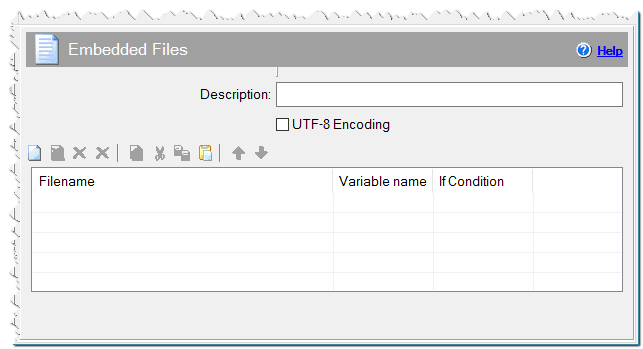
Embedded files command
How to embed a file by using the Source Code command
You can embed files in the installation script by using the Source code command and Gentee programming language. Below is an example of embedding a file and assigning it to a 'myfile' variable.
macrox_setstr ("myfile", "\<c:\myapp\data.txt>")
It is also possible to embed binary files in the script. In this case, use the 'buf' type variable.
buf myfile

myfile = "\<c:\myfiles\myfile.dat>"
print("Size: \(*myfile)")