
Decompress ZIP file during the installation process
This command allows you to decompress a ZIP file during the installation process with standard Windows. This command works beginning with Windows 2000.
Description
Optionally, you may add comments here describing the purpose of this element.
Path
Choose the path in which the zip file is placed.
APPLICATION DATA PATH - Program subfolder in Application Data folder.
CDROM PATH - CD or DVD drive.
CUSTOM PATH - The path must be defined in the filename control.
INSTALL PATH - Default installation path.
SETUP FILE PATH - The path to where setup executable file is running.
SYSTEM PATH - Windows system directory.
TEMPORARY PATH - The temporary folder of the installation #tempinstpath#. It is a subfolder genteeXX in the default temporary user's folder #temppath#.
WINDOWS PATH - Windows directory.
Filename [ZIP]
Specify the name of the archive ZIP file to be unpacked.
mydata.zip
Destination folder
Choose the destination path in which files and folders will be unpacked.
APPLICATION DATA PATH - Program subfolder in Application Data folder.
CDROM PATH - CD or DVD drive.
CUSTOM PATH - The path must be defined in the filename control.
INSTALL PATH - Default installation path.
SETUP FILE PATH - The path to where setup executable file is running.
SYSTEM PATH - Windows system directory.
TEMPORARY PATH - The temporary folder of the installation #tempinstpath#. It is a subfolder genteeXX in the default temporary user's folder #temppath#.
WINDOWS PATH - Windows directory.
Custom Path
Here you can specify any destination path, if CUSTOM PATH is selected in the Destination folder field.
Do not Display Progress Dialog Box
Check this box if you do not want the user to see a window with decompression progress. Works on Windows Vista and higher.
Rewrite if files already exist
Check this box if you want to rewrite existing files and not ask for user confirmation. Works on Windows Vista and higher.
If Condition
You can specify a condition that should be met for the action to be performed. If the condition is false then the command is skipped. See How to use If Condition for more details.
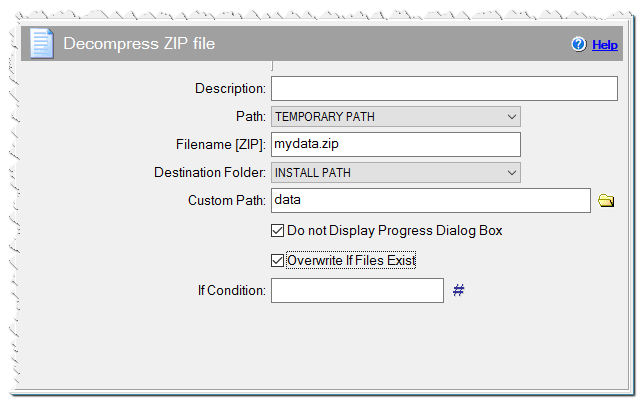
Decompress ZIP file command