
Calculate hash
This command calculates hash values (CRC32, MD5 and SHA1) for specified files. You can choose an algorithm to calculate hash values and enter a list of files. Calculated values are written to the corresponding variables.
Description
Optionally, you may add comments here describing the purpose of this element.
Hash Algorithm
Choose the algorithm to be used to calculate hash values. You can select CRC32, MD5 or SHA1 algorithm.
Upper case
If you check it, the result string will be in upper case.
Path
Choose the path to the file.
APPLICATION DATA PATH - Program subfolder in Application Data folder.
CDROM PATH - CD or DVD drive.
CUSTOM PATH - The path must be defined in the filename control.
INSTALL PATH - Default installation path.
SETUP FILE PATH - The path to where setup executable file is running.
SYSTEM PATH - Windows system directory.
TEMPORARY PATH - The temporary folder of the installation #tempinstpath#. It is a subfolder genteeXX in the default temporary user's folder #temppath#.
WINDOWS PATH - Windows directory.
Filename
Enter the name of the file, which you need to calculate a hash value. If you use a CUSTOM PATH, the full path to the file should be specified.
Variable Name
Enter the name of the variable where calculated hash values should be written. If there is an error in calculation, the value of the variable will be an empty string.
If Condition
You can specify a condition that should be met for the action to be performed. If the condition is false then the command is skipped. See How to use If Condition for more details.
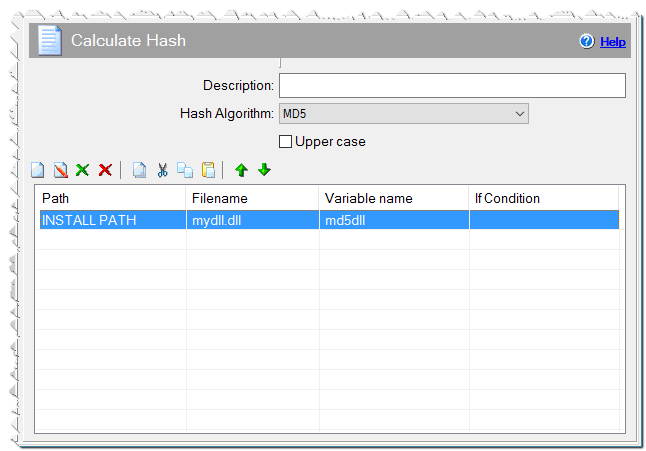
Calculate hash command
Comment
You can add a comment for this setting here.