
Uninstall Log Mode
Disables or enables writing to the uninstall log file.
Description
Optionally, you may add comments here describing the purpose of this element.
Write to the Uninstall Log
On - Starts the recording of any subsequent installation events to the uninstall log file used by the uninstaller and sets the behavior of the uninstaller with respect to uninstalling files and folders. This behavior can be altered for groups of files by repeating calls to this command in a setup script sequence setting the required mode.
Off - Disable output to uninstall log file. No further installation events will be recorded and therefore the install actions will not be reversed during un-installa.
On (Mode 1) - Files from Installation files command are added to the un-install log file if they are overwritten. By default, only new files are added to the log file.
On (Mode 2) - All files from Installation files command are added to the un-install log file even they are skipped.
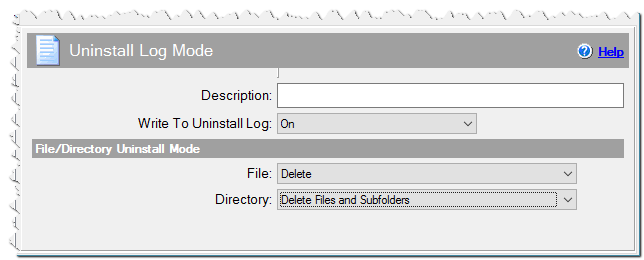
Uninstall Log Mode command
File/Directory Uninstall Mode
When files or directories are created during the process of installation, the information about what is to be done with these files or directories during the uninstall process is added to the log file. Here you can specify these actions.
File
What should be done to the files during the uninstall process.
No change - do not change the current method.
Delete - Delete the file.
User Confirm Deletion - Ask user whether the file should be deleted.
Add to File List - Add the file to the list of remaining files. User can see the list at the end of the uninstall and choose to delete or retain these files.
Directory
What should be done to files when deleting directories.
No change - do not change the current method.
Add Files to File List - Add files to the list of remaining files. See above.
Delete Files and Subfolders - When deleting a directory, delete all of its contents as well.
Do not Delete If It Contains Files - Leave the directory contents unchanged.