
Add To Add/Remove List
Adds uninstall information to Settings-Add/Remove window. (Control Panel>Add/Remove Programs>Program List). You can specify additional information about the program at Project - Product details.
Description
Optionally, you may add comments here describing the purpose of this element.
Display Name
The application name in the Add/Remove list.
<default> = #progname#
Estimated Size (KB)
You can specify the estimated size (kilobytes) of the application. If you specify 1, the estimated size is equal the summary size of installation files.
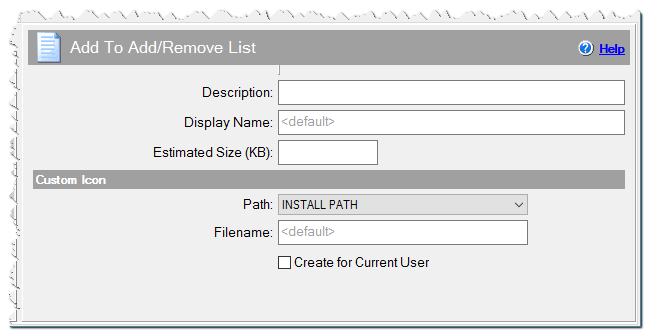
Add To Add/Remove List command
Custom Icon
If you wish to use a certain icon for your program in the Add/Remove list, specify it here.
Path
Path to the desired icon file.
APPLICATION DATA PATH - Program subfolder in Application Data folder.
CDROM PATH - CD or DVD drive.
CUSTOM PATH - The path must be defined in the filename control.
INSTALL PATH - Default installation path.
SETUP FILE PATH - The path to where setup executable file is running.
SYSTEM PATH - Windows system directory.
TEMPORARY PATH - The temporary folder of the installation #tempinstpath#. It is a subfolder genteeXX in the default temporary user's folder #temppath#.
WINDOWS PATH - Windows directory.
Filename
The icon file name. If you use a CUSTOM PATH, the full path to the file should be specified. Example myicon.ico
myapp.exe
Create for Current User
By default, the program is added to the Add/Remove list for all users, but you can add the uninstallation to the current user's list only. If the installation runs without administrative rights, it will automatically add the uninstallation to the current user's list.
What variables are used
This command writes the following parameters. All these variables are assigned automatically but you can redefine them:
- UninstallString - full path uninstall.exe file. Variable: uninstexe
- DisplayName - The display name in the list. Variable: undisplay
- DisplayIcon - The full path to the custom icon file. Variable: unicon
- DisplayVersion - The version of the program. Variable: ver
- HelpLink - The URL of the support page. Variable: supurl
- HelpTelephone - The support phone. Variable: phone
- InstallLocation - Installation path. Variable: instlocation or setuppath
- Publisher - The publisher of the program. Variable: compname
- URLInfoAbout - The URL of product page. Variable: produrl
- URLUpdateInfo - The URL of update page. Variable: updurl