
Product details
The main information about the program and the publisher.
Product name
The name of the program. This name is used in the folder names.
<default> = project name
variable = progname
Version
The version of the program. You can specify an executable exe file for getting the number of the version from VERSION_INFO resource. In this case, CreateInstall gets the version automatically. You can also check on the checkbox 'Include VERSION_INFO resource' on Install Script - Install page.
variable = ver
1.1.0
c:\my application\myapp.exe
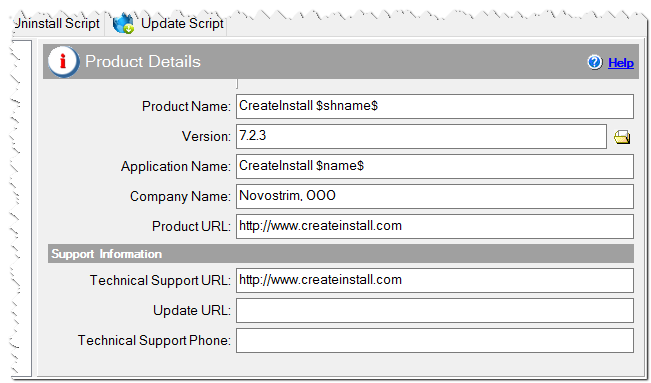
Product details of the installation
Application Name
The full name of the application. This name is used in captions and dialog texts.
<default> = #progname# #ver#
variable = appname
Company Name
The company or publisher name.
variable = compname
Product URL
The URL of a page with information about the program.
variable = produrl
Technical Support URL
The URL of the support web-page.
variable = supurl
Update URL
A link to the program update page.
variable = updurl
Technical Support Phone
Support hot line phone.
variable = phone