
Update
You can include a simple update program in your setup. This program can check for your application updates. This update program downloads the config file from your web-server and compares the current user's version and the latest version that is defined in the config file. If you want to use the update feature you must specify Version parameter on Project - Product Details and all parameters on this page. Also, your Install Script must contain Create Uninstall & Update Exe command which creates the update executable file.
Include Updater
Check this box to include an updater program in your installation.
Checked => The updater is included.
Path
The directory where the update executable file will be created.
APPLICATION DATA PATH - Program subfolder in Application Data folder.
CUSTOM PATH - The path must be defined in the filename control.
INSTALL PATH - Default installation path.
SYSTEM PATH - Windows system directory.
TEMPORARY PATH - The temporary directory of the installation #tempinstpath#. It is a subfolder genteeXX in the default temporary user's folder #temppath#.
WINDOWS PATH - Windows directory.
Update Executable File
The update executable file name.
#setuppath#\tools\myupdate.exe (if CUSTOM PATH)
Config File on Web-server
This file is created automatically when you create the setup. You can find this file in the same directory as Output Folder for your setup file. Config file is a simple .ini file and you can create and modify it yourself.
Config File URL
Specify the full web-path to your config file on your web-site. Don't specify the name of the config file.
http://www.mydomain.com/downloads/
Config Filename
Specify the name of the config file.
myapp_update.ini
New version URL
Specify the URL of the homepage or download page where the user will be redirected when agreeing to look at the new version. This parameter is stored in the config file.
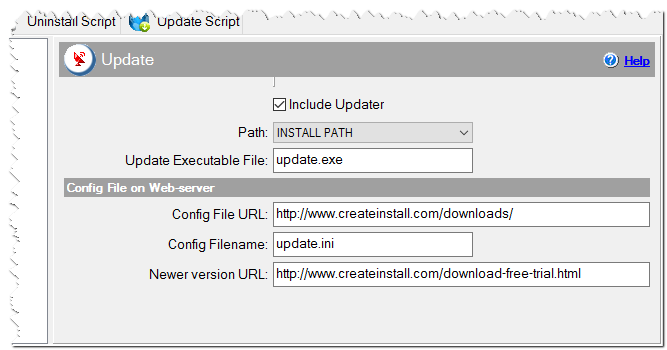
Update settings
How to use Update feature
1. Specify all parameters here and create your setup.
2. Find the config file in Output Folder and upload it on the website. The config file must be stored as Config File URL/Config Filename.
3. You can create a 'Check for Update' menu item in your application and execute update.exe when the user clicks it.
4. You can use a command line parameter -s. If you run update.exe -s then it shows a message box only if there is a new version. Use it if you run update.exe automatically.
Format of Config File
The update config file is a simple ini file. You can create and edit it yourself. It can be uploaded on your webserver any time.
[main]
version=x.x.x
url=http://www.mydomain.com/
version
The latest version of your application.
url
The webpage which is opened when a newer version is available and the user agrees to visit the homepage of the program.