
Installation Settings
Common installation settings.
Setup Language
The default language to be used in the installation. All available languages are stored in the Language subfolder of CreateInstall.
variable = langinst
Additional Languages
Here, you can specify additional languages that will be included in your setup. You can press a button on the left and select the required languages in a dialog window. Use a special script command or function for choosing and changing the current setup language.
german, french, spanish
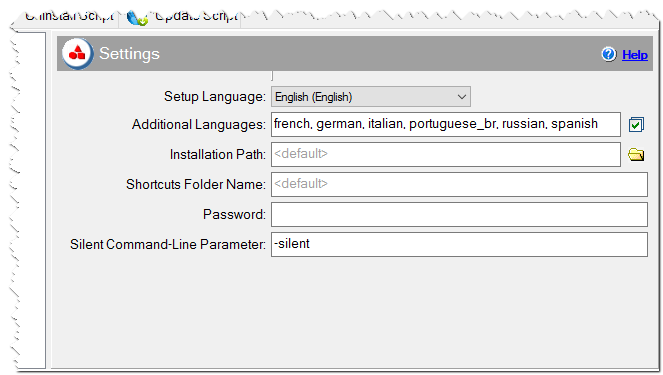
Common installation settings
Installation Path
The main installation path of the application.
<default> = #progfiles#\#progname#
variable = setuppath
c:\My application
Shortcuts Folder Name
The name of the shortcuts folder.
<default> = #progname#
variable = shfolder
Password
Your installation can be password-protected. In that case, a user will be prompted to enter a password during the installation process. Specify the password here to require a password for installation. In this case, all files will be encrypted. Your setup will not contain this password. The installation will compare only a control sum (CRC) of the password, that is why special encryption software is used, to ensure better protection of your data.
Silent Command-Line parameter
You can specify the command-line parameter for silent installations. For example, you have specified -silent here and if the user runs yoursetup.exe -silent then all dialogs will be skipped. Clear this field if you don't want to support the silent installation feature.