
Setup Builder
Settings for managing the installation creation.
Close Automatically upon Completion
Checked => The window of setup builder is closed automatically after the installation is created successfully.
Launch Setup on Close
Checked => The installation runs when the window of setup builder is closed.
Ignore if no files for compression were found
By default, the installer gives you a warning if you specified a file or wildcard in the command Installation Files or Temporary Files, but during the creation of the installation that file does not exist. Check this box if you want CreateInstall to ignore this situation and not to show a warning.
Run Before Creating Setup
You can specify an application which will run before creating your setup.
Run After Creating Setup
You can specify an application which will run after creating your setup.
Compress an installation into a zip file
If you check this box, a ZIP file with your installation will be created in the same directory after completion of installation creation.
ZIP Filename
If you enable the ZIP file creation option you can specify any name and full path for the ZIP file to be created. By default, a .zip file with the same name as the installation file created will be created in the same directory.
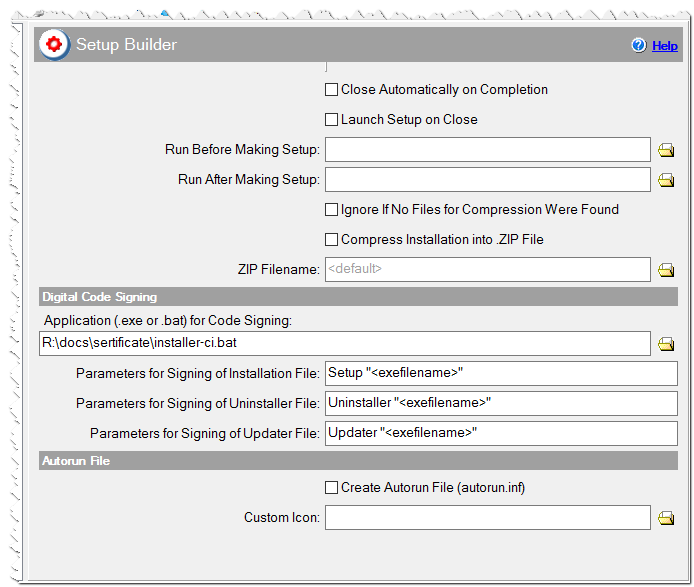
Setup builder settings
Digital Code Signing
CreateInstall can sign the installation and uninstaller with a digital signature if you have it. For example, you can buy it on Verisign, Comodo.
Application (.exe or .bat) for Code Signing
Specify the full path to the signtool.exe application or the .bat file.
C:\Program Files\Microsoft Visual Studio 8\Common7\Tools\Bin\signtool.exe
Parameters for Signing of Installation File
Specify the command line parameters for signtool.exe application or bat file. If it is empty then your installation file won't be signed. Use <exefilename>, it will be replaced with the real filename of setup.exe file to be signed.
sign /a /f R:\sertificate\my.pfx /d "MyApp" /p mypsw
   /t http://timestamp.comodoca.com/authenticode  "<exefilename>"
Parameters for Signing of Uninstaller File
Specify the command line parameters for signtool.exe application or bat file. If it is empty then your uninstaller file won't be signed. Use <exefilename>, it will be replaced with the real filename of uninstall.exe file to be signed.
sign /a /f R:\sertificate\my.pfx /d "MyApp Uninstaller" /p mypsw
   /t http://timestamp.comodoca.com/authenticode  "<exefilename>"
Parameters for Signing of Updater File
Specify the command line parameters for signtool.exe application or bat file. If it is empty then your updater file won't be signed. Use <exefilename>, it will be replaced with the real filename of update.exe file to be signed.
sign /a /f R:\sertificate\my.pfx /d "MyApp Updater" /p mypsw
   /t http://timestamp.comodoca.com/authenticode  "<exefilename>"
You can move signtool.exe and common command line parameters into .bat file. In this case, it is enough to specify "<exefilename>" in Parameters fields.
Autorun File
These settings allows you to create autorun file autorun.inf. It run programs automatically on CD\DVD and flash-drives.
Create Autorun File (autorun.inf)
Checked => The autorun file is created in the same folder as the setup file.
Custom Icon
You can specify any icon. It will be copied into the output folder if it doesn't exist there.