
How to manage Windows reboot
During installation, some files may be locked by system processes, and can be updated only after rebooting the computer. In this case, the setup prompts the user to reboot the computer at the end of the installation process. Generally, you don't need to reboot the computer in the installations made with the CreateInstall installer, but you can force reboot or reboot with confirmation by using the Exit/Reboot command. This command can be inserted into your setup script, where the restart of the user's computer is required.
On the other hand, you can cancel or activate the Windows reboot with a special variable, reboot. You can always check the value of this variable. If it is 1, the setup could not update some files and the installation will prompt the user to reboot the machine. Otherwise, the reboot is not required. You can change the value of this variable by using the Set variables or Source code commands with the function macrox_setint. For example, you can cancel the restart, if you know that the program will work with the current versions of files. If you need the program to be started after a reboot, then assign 'reboot' to 1 and add the Action After Reboot command.
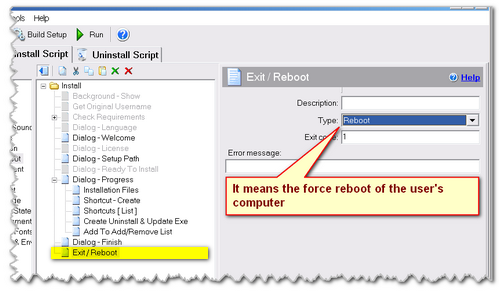
Force reboot the user's computer
Note that by default , and when you use the Exit/Reboot command (+Reboot with Confirmation option), the user is asked to allow a restart of the computer. In this case, the user can refuse to restart Windows and do it later. If you assign the value to 1 or use the Exit/Reboot command (+Reboot option), there will be a forced reboot. In this case, it is better to warn the user of that action in a dialog box or informational message.